SAPIEN Technologies, Inc.
  • Home
  • Software
    • PowerShell Studio
    • PrimalScript
    • SAPIEN DevOps Suite
    • VersionRecall
    • PowerShell ModuleManager
    • PowerShell HelpWriter
    • CIM Explorer
    • PrimalXML
    • PrimalSQL
  • Product Support
    • SAPIEN Support
    • Support Uploads
    • Frequently Asked Questions
    • Document Center
  • Company
    • Contact Us
    • Resellers
    • EULA
    • Privacy Policy
    • SDL Practices
  • Blog
  • Store
    • Software
    • Maintenance Renewals
    • Support
    • Upgrades
    • Shopping Cart
    • Store Checkout
    • Generate a Quote
    • Store Support
  • My Account

SAPIEN Technologies

  • Blog
March 25, 2014 / by June Alane Reif / ChangeVue, General, Howto, PowerShell Studio, PrimalScript, PrimalSQL, PrimalXML, VersionRecall / 3 Comments

Activating Your New Subscription

[UPDATED: 8/15/2014]

So, you just got a new subscription to a SAPIEN product. You’ve run the installer and you’ve launched the product and you were presented with a screen like this:

Activation

Where do you go from here?  Well, since you already have a subscription number, you can pretty much ignore the buttons on the top right.

x

Instead, focus on the section below the text “If you have a current subscription number, please enter or paste it into the field below.”

If you DO NOT already have a SAPIEN account (this is not necessarily the same as your store account!), click the “Create Account” button to create an account.

createaccount

This will launch your browser and take you through the steps to create your SAPIEN account.

If you DO have a SAPIEN account, you can obviously skip that step.

Enter your SAPIEN account username in the field that is labeled “SAPIEN ID” and your SAPIEN account password in the field labeled “Password”.

credentials

Your subscription number IS your License Number. Enter your subscription number in the place provided for license number—hyphens are optional.
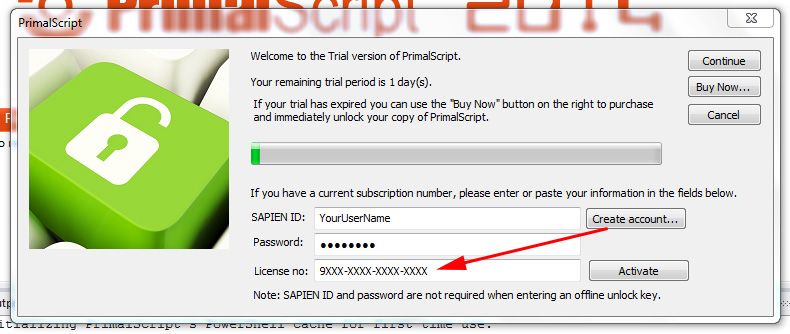
subscriptionnumber

Click on the “Activate” button which is now highlighted.

unlock

If your activation is successful, you will be presented with a screen that says as much and your new subscription will have been registered to your SAPIEN account.

success

Should an issue arise and the activation fails, you will be presented with a fairly clear explanation of what happened as shown in the example below.

error

Make sure you have entered everything correctly and try again. If you still can’t activate, contact us at sales@sapien.com.

Although our example uses PrimalScript 2014, this procedure is the same for PowerShell Studio 2014, VersionRecall 2014, ChangeVue 2014, PrimalSQL 2014, PrimalXML 2014 and SAPIEN Software Suite 2014. All activations require an active internet connection. There can on occasion, be exceptions to that rule.  If you have a legitimate reason for needing offline access, please fill out a request for an offline key. All requests will be considered on a case-by-case basis.

activation, ChangeVue, MySAPIEN, PowerShell Studio, PrimalScript, PrimalSQL, PrimalXML, SAPIEN Software Suite, Subscription, VersionRecall, Your SAPIEN Account

Post navigation

From script to server – Deploying solutions with PrimalScript 2014 (Part 1)
PowerShell Studio 2014: What New in the Designer?

3 comments on “Activating Your New Subscription”

  1. SAPIENTech says:
    March 25, 2014 at 8:00 am

    Activating Your New Subscription: So, you just got a new subscription to a SAPIEN product. You’ve run the… http://t.co/uPN2hOnUGW

  2. DMCA Force says:
    March 25, 2014 at 8:46 am

    DMCA Force liked this on Facebook.

  3. SAPIENDavid says:
    March 25, 2014 at 9:02 am

    RT @SAPIENTech: Activating Your New Subscription: So, you just got a new subscription to a SAPIEN product. You’ve run the instal… http://…

Comments are closed.

Search

Enter any query and press enter
Advanced search operators:
+ ⟶ Term must appear
- ⟶ Term must not appear
"" ⟶ Exact string must appear
How do I use these?
Oldest First Newest First

Join our mailing list

Enter your email address to subscribe to our mailing lists for Monthly Blog Digests, Product Announcements and more (you can choose which you receive once you sign-up!)

Tags

#Requires-first.NET.net framework4thofJuly5DAYS30 Years32 bit32bit64 bit201120122013201420152016201720182019

Categories

  • 20,000 feet (91)
  • Ask the Experts (31)
  • Automation (5)
  • Back from TechEd (16)
  • Bash (8)
  • Batch/CMD (23)
  • Beginners (41)
  • Behavior-Driven Development (BDD) (4)
  • Best practices (19)
  • Beta Testing (2)
  • Books and Training (184)
  • Classes in PowerShell 5.0 (8)
  • Conference (3)
  • Events (82)
  • Exchange Management Shell (2)
  • Feature Peek (31)
  • Forum (1)
  • Gadgets (12)
  • General (538)
  • Git (2)
  • GitHub (2)
  • GUIProgramming (30)
  • Howto (151)
  • IT (3)
  • Module Manager (3)
  • MySQL (2)
  • Newsletter (9)
  • Pester (5)
  • Poll (5)
  • PowerShell (71)
  • PowerShell 5.0 (34)
  • PowerShell Blogging Week (1)
  • PowerShell Core (24)
  • PowerShell HelpWriter (10)
  • PowerShell Module (5)
  • PowerShell Versions (5)
    • PowerShell 5.0.10586.122 (2)
    • PowerShell 5.0.14279.1000 (2)
    • PowerShell 5.1.14352.1002 (2)
  • PrimalSQL (14)
  • PS Version 5.0 (5)
  • PSCore6 (16)
  • Puzzle (6)
  • Quick Guide (5)
  • Reference (1)
  • Sales and Promotions (19)
  • SAPIEN Account (1)
  • SAPIEN MVP (10)
  • SAPIEN Tour (13)
  • Scripting (17)
  • Service Build (90)
  • Software News (661)
    • ChangeVue (16)
    • Community Tools (33)
    • Free Tools (24)
    • iPowerShell (38)
    • PowerShell HelpWriter (9)
    • PowerShell ModuleManager (1)
    • PowerShell Studio (158)
    • PowerShell Studio 2012 (76)
    • PrimalCSV (4)
    • PrimalForms (83)
    • PrimalForms 2011 (74)
    • PrimalPad (15)
    • PrimalScript (195)
    • PrimalScript Studio (7)
    • PrimalScript v.Next (31)
    • PrimalSQL (5)
    • PrimalTools (28)
    • PrimalXML (3)
    • Productivity Pack (4)
    • SAPIEN Update Tool (1)
    • ScriptMerge (1)
    • User Reviews (7)
    • VersionRecall (19)
    • What's new (89)
  • Software Release (4)
  • Spotlight on Controls (32)
  • Survey (2)
  • Test-Driven Development (5)
  • Testing (4)
  • Tip (12)
  • Trivia (2)
  • User interface design for administrators (5)
  • UserGroup (11)
  • VBScript (121)
  • VBScript Scripts (6)
  • Versions (2)
  • Videos (7)
  • Web Tools (2)
  • Website Maintenance (1)
  • Windows PowerShell (724)
  • Windows Scripting News (71)
  • WMI Explorer (13)
  • Women in PowerShell (4)

Archives

Dashboard

  • Entries feed
  • Comments feed
  • WordPress.org

    Software

  • PowerShell Studio
  • PrimalScript
  • SAPIEN DevOps Suite
  • VersionRecall
  • PowerShell ModuleManager
  • PowerShell HelpWriter
  • CIM Explorer
  • PrimalXML
  • PrimalSQL
  • Free Tools and Trial Downloads

    Product Support

  • SAPIEN Support
  • Support Uploads
  • PowerShell 7 Runtimes
  • Document Center
  • YouTube Videos
  • Frequently Asked Questions

    Store

  • Software
  • Maintenance Renewals
  • Support
  • Upgrades
  • Shopping Cart
  • Checkout
  • Refund Policy
  • Store Support

    Blog

    Company

  • Contact Us
  • Resellers
  • EULA
  • Privacy Policy
  • Secure Development Lifecycle Practices
  • Copyright
  • Cookie Preferences

    Account

  • Signup
  • Login
  • SAPIEN Home

  • Site Map

Follow us on
 

© Copyright 2026 SAPIEN Technologies, Inc.

© Copyright 2026
SAPIEN Technologies, Inc.