SAPIEN Technologies, Inc.
  • Home
  • Software
    • PowerShell Studio
    • PrimalScript
    • SAPIEN DevOps Suite
    • VersionRecall
    • PowerShell ModuleManager
    • PowerShell HelpWriter
    • CIM Explorer
    • PrimalXML
    • PrimalSQL
  • Product Support
    • SAPIEN Support
    • Support Uploads
    • Frequently Asked Questions
    • Document Center
  • Company
    • Contact Us
    • Resellers
    • EULA
    • Privacy Policy
    • SDL Practices
  • Blog
  • Store
    • Software
    • Maintenance Renewals
    • Support
    • Upgrades
    • Shopping Cart
    • Store Checkout
    • Generate a Quote
    • Store Support
  • My Account

SAPIEN Technologies

  • Blog
March 27, 2018 / by June Alane Reif / General, SAPIEN Account, Web Tools / No Comments

How To Generate an Online Quote

When it comes time to renew or reinstate your software, you may find that you need a formal quote for your purchasing or accounting department. Previously you had to contact our sales team and wait to receive a quote. Well, good news! You can now generate formal quotes from your SAPIEN account page!

To generate a quote for a single product, select Get a Renewal Quote or Get a Reinstatement Quote next to the subscription in question:

Your quote will display in a new window. For a print or electronic copy, click Get PDF:

Print or Save your quote:

To generate a quote for multiple products, gather the subscription numbers you need for your quote and then select Click to generate renewal/reinstatement quote in the Account Tools section on the right of the browser window:

On the Subscription Renewal / Reinstatement Quote page, enter the subscription numbers for your quote. Enter each number on a separate line in the text box provided, and then select Continue:
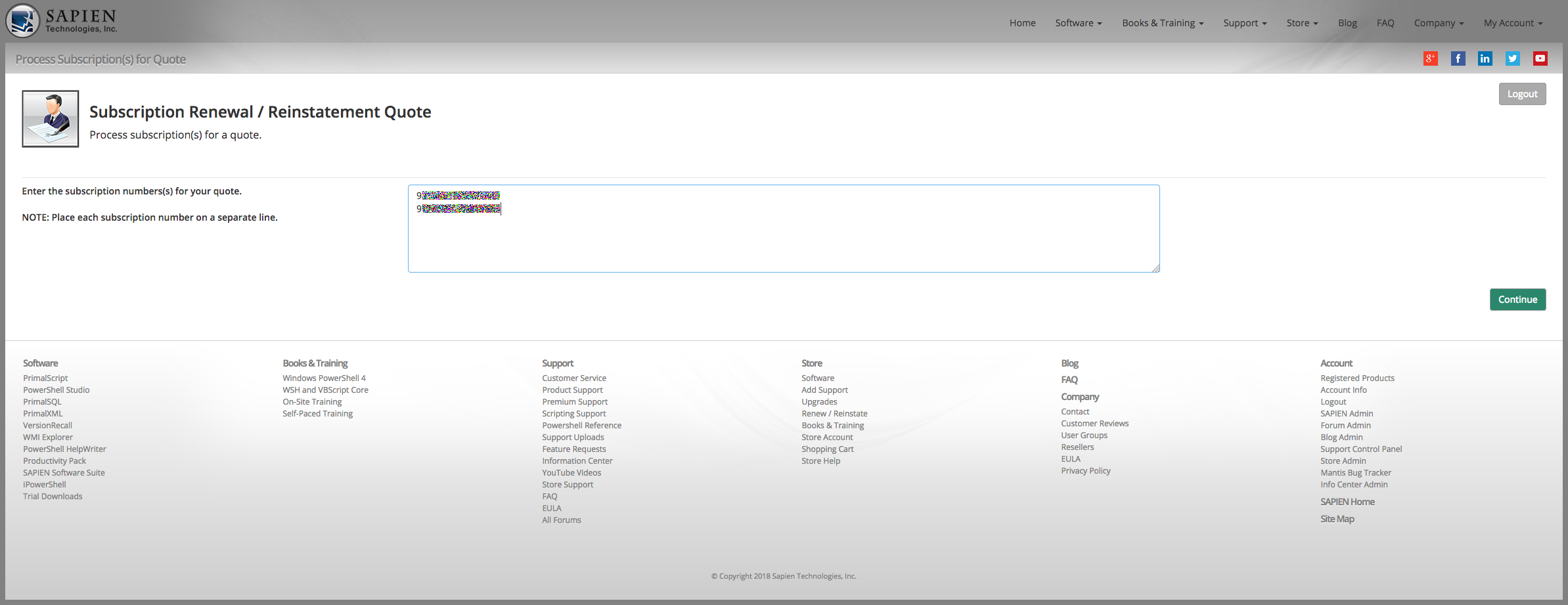
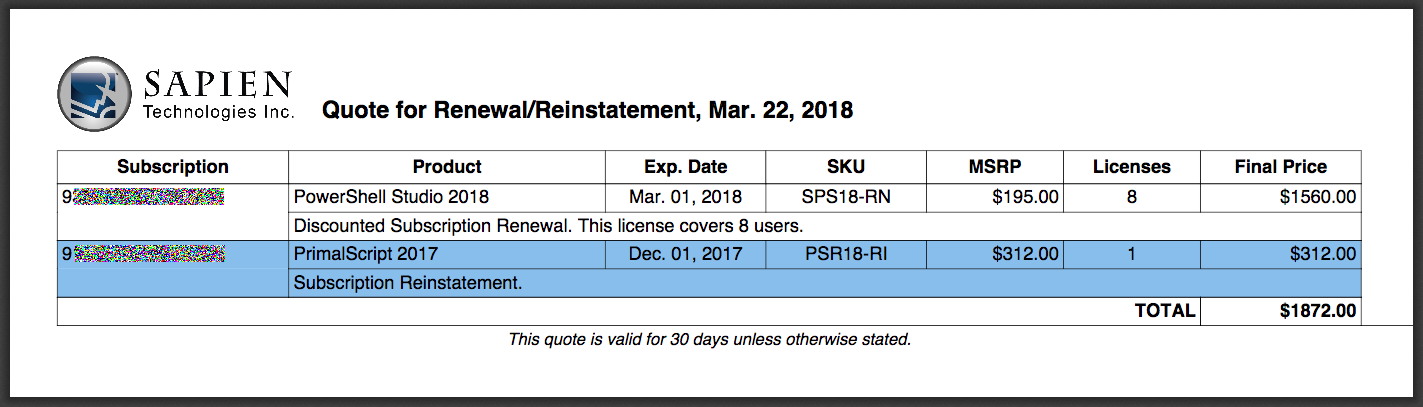
The screen will refresh with your quote. For a print or electronic copy, click Get PDF:

Print or Save your quote:

Reinstatement, Renew, Subscription, Subscription Reinstatement, Subscription Renewal

Post navigation

Storing PowerShell Variables in External files
PowerShell Studio: Working with PowerShell Core

Search

Enter any query and press enter
Advanced search operators:
+ ⟶ Term must appear
- ⟶ Term must not appear
"" ⟶ Exact string must appear
How do I use these?
Oldest First Newest First

Join our mailing list

Enter your email address to subscribe to our mailing lists for Monthly Blog Digests, Product Announcements and more (you can choose which you receive once you sign-up!)

Tags

#Requires-first.NET.net framework4thofJuly5DAYS30 Years32 bit32bit64 bit201120122013201420152016201720182019

Categories

  • 20,000 feet (91)
  • Ask the Experts (31)
  • Automation (5)
  • Back from TechEd (16)
  • Bash (8)
  • Batch/CMD (23)
  • Beginners (41)
  • Behavior-Driven Development (BDD) (4)
  • Best practices (19)
  • Beta Testing (2)
  • Books and Training (184)
  • Classes in PowerShell 5.0 (8)
  • Conference (3)
  • Events (82)
  • Exchange Management Shell (2)
  • Feature Peek (31)
  • Forum (1)
  • Gadgets (12)
  • General (538)
  • Git (2)
  • GitHub (2)
  • GUIProgramming (30)
  • Howto (151)
  • IT (3)
  • Module Manager (3)
  • MySQL (2)
  • Newsletter (9)
  • Pester (5)
  • Poll (5)
  • PowerShell (71)
  • PowerShell 5.0 (34)
  • PowerShell Blogging Week (1)
  • PowerShell Core (24)
  • PowerShell HelpWriter (10)
  • PowerShell Module (5)
  • PowerShell Versions (5)
    • PowerShell 5.0.10586.122 (2)
    • PowerShell 5.0.14279.1000 (2)
    • PowerShell 5.1.14352.1002 (2)
  • PrimalSQL (14)
  • PS Version 5.0 (5)
  • PSCore6 (16)
  • Puzzle (6)
  • Quick Guide (5)
  • Reference (1)
  • Sales and Promotions (19)
  • SAPIEN Account (1)
  • SAPIEN MVP (10)
  • SAPIEN Tour (13)
  • Scripting (17)
  • Service Build (90)
  • Software News (661)
    • ChangeVue (16)
    • Community Tools (33)
    • Free Tools (24)
    • iPowerShell (38)
    • PowerShell HelpWriter (9)
    • PowerShell ModuleManager (1)
    • PowerShell Studio (158)
    • PowerShell Studio 2012 (76)
    • PrimalCSV (4)
    • PrimalForms (83)
    • PrimalForms 2011 (74)
    • PrimalPad (15)
    • PrimalScript (195)
    • PrimalScript Studio (7)
    • PrimalScript v.Next (31)
    • PrimalSQL (5)
    • PrimalTools (28)
    • PrimalXML (3)
    • Productivity Pack (4)
    • SAPIEN Update Tool (1)
    • ScriptMerge (1)
    • User Reviews (7)
    • VersionRecall (19)
    • What's new (89)
  • Software Release (4)
  • Spotlight on Controls (32)
  • Survey (2)
  • Test-Driven Development (5)
  • Testing (4)
  • Tip (12)
  • Trivia (2)
  • User interface design for administrators (5)
  • UserGroup (11)
  • VBScript (121)
  • VBScript Scripts (6)
  • Versions (2)
  • Videos (7)
  • Web Tools (2)
  • Website Maintenance (1)
  • Windows PowerShell (724)
  • Windows Scripting News (71)
  • WMI Explorer (13)
  • Women in PowerShell (4)

Archives

Dashboard

  • Entries feed
  • Comments feed
  • WordPress.org

    Software

  • PowerShell Studio
  • PrimalScript
  • SAPIEN DevOps Suite
  • VersionRecall
  • PowerShell ModuleManager
  • PowerShell HelpWriter
  • CIM Explorer
  • PrimalXML
  • PrimalSQL
  • Free Tools and Trial Downloads

    Product Support

  • SAPIEN Support
  • Support Uploads
  • PowerShell 7 Runtimes
  • Document Center
  • YouTube Videos
  • Frequently Asked Questions

    Store

  • Software
  • Maintenance Renewals
  • Support
  • Upgrades
  • Shopping Cart
  • Checkout
  • Refund Policy
  • Store Support

    Blog

    Company

  • Contact Us
  • Resellers
  • EULA
  • Privacy Policy
  • Secure Development Lifecycle Practices
  • Copyright
  • Cookie Preferences

    Account

  • Signup
  • Login
  • SAPIEN Home

  • Site Map

Follow us on
 

© Copyright 2026 SAPIEN Technologies, Inc.

© Copyright 2026
SAPIEN Technologies, Inc.